The Participant Audit Log tracks all changes made to a participant’s data. Each row in the log records an audited event, detailing what changed and which user made the change.
You can access the Participant Audit Log in two ways:
From the Study Audit Log:
- Click Study Audit Log from the navigation menu or the Tasks menu.
- Click the icon in the Actions column for the desired participant.
From the Participant Details Page (PDP):
Navigate to the PDP for the participant you wish to review.
Study Audit Log
The Study Audit Log page provides high-level information about each participant, offering a central point of access for all participants’ audit logs. The table includes the following elements:
Participant Data
- Participant ID: Unique identifier for each participant. Each row represents a participant in the study.
- Created By: Username of the user who added the participant.
- Status: Current status of the participant (e.g. Available, Removed).
- Actions: Click the View icon to access the detailed audit history for the selected participant.
- Table Controls
- Pagination Controls: Located at the top of the table, these allow you to navigate through the list of participants. Use the buttons for first/previous/next/last page, and the page-size selector to adjust the number of rows shown per page.
- Filters: Text boxes or filter links appear in the header row, allowing you to enter criteria and click Apply Filter to narrow the list by Participant ID or other values. The Clear Filter link resets the filtering

Participant Audit Log
The Participant Audit Log details what data was added, modified, or removed at the participant, event, and form levels, when it was changed, and who made each change. The combination of timestamp, event type, and old/new values provides a complete history of the participant record, including changes made to participant-level data, event data, and form data.
Participant-Level Data
Participant-level data includes updates to status and contact information. The first two tables within the Participant Audit Log show this information.
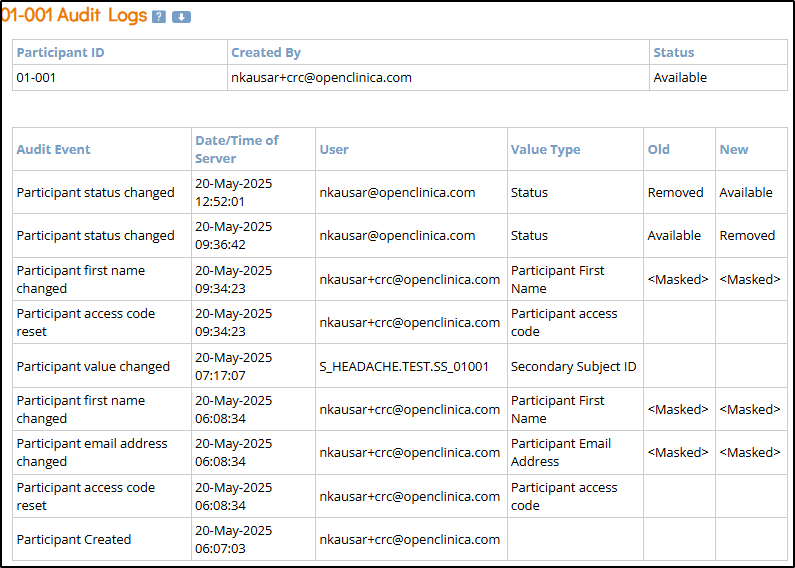
- Participant ID: Unique identifier for each participant in the study.
- Created By: Username of the person who created the participant record.
- Status: Current status of the participant (e.g., Available, Removed).
- Audit Event: Type of action recorded (e.g., Participant Created, Participant [contact data type] changed).
- Date/Time of Server: Server timestamp when the audit event occurred.
- User: Username of the person who performed the logged action.
- Value Type: Field that was modified (e.g., Participant First Name, Status).
- Old: The value before the change was made (blank if newly created).
- New: The updated value after the change (blank if the value was removed).
ℹ️ Note: Protected data, such as the participant’s email or name, will be masked in the audit logs.
Event-Level Data
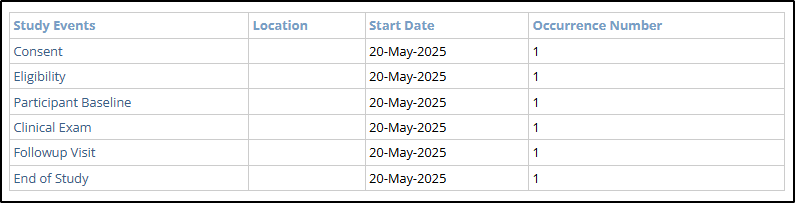
Event-level data includes updates to a participant’s events. This section contains a Table of Contents with links to the various events and the associated event-specific audit log.
- Event Table of Contents
- Study Events: The defined visits or timepoints for a study participant (e.g., Consent, Follow-up).
- Start Date: The planned or actual start date of a specific study event.
- Occurrence Number: Indicates how many times a repeating study event has occurred.
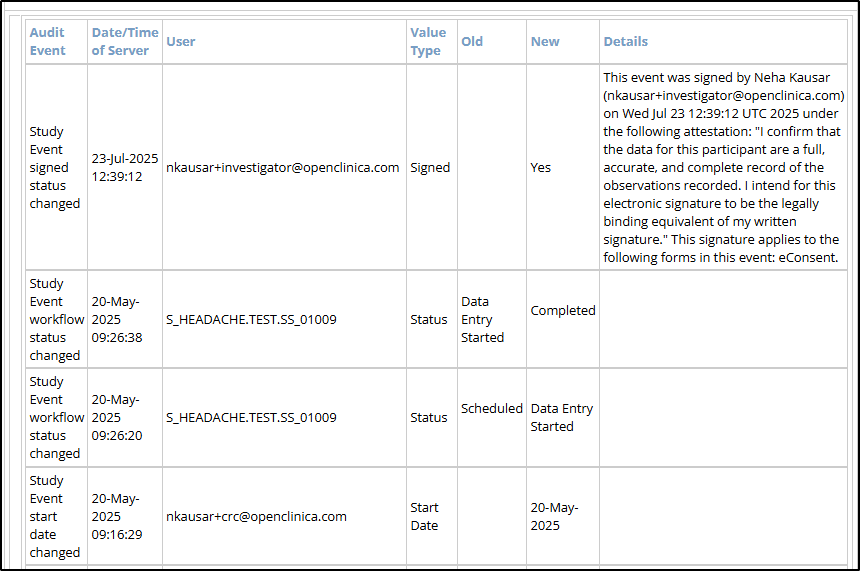
- Event Audit Log
- Audit Event: The type of action recorded (e.g., Study Event workflow status changed, Study Event start date changed, etc.)
- Date/Time of Server: The server timestamp when the audit event occurred.
- User: The username of the person who performed the logged action.
- Value Type: The field that was modified (e.g., Status, Start Date).
- Old: The value before the change was made. Blank if newly created.
- New: The updated value after the change. Blank if the value was removed.
- Details: Populated when an Investigator signs the participant’s event.
Form-Level Data
Form-level data includes information about form status as well as all data entry / updates made to form data. There is a table that acts as a Table of Contents including links to the various events, as well as the event-specific audit log.
- High Level Form Information
- Name: The name of the form.
- Version: The current version of the form.
- Owner: There are two possible options for the owner:
- Form entered or modified by the study user in Study Runner: The owner is shown as the user’s email address.

- Form entered or completed by the Participant in Participate: The owner is shown as the participant’s unique ID.

- Form entered or modified by the study user in Study Runner: The owner is shown as the user’s email address.
- Form Data Changes
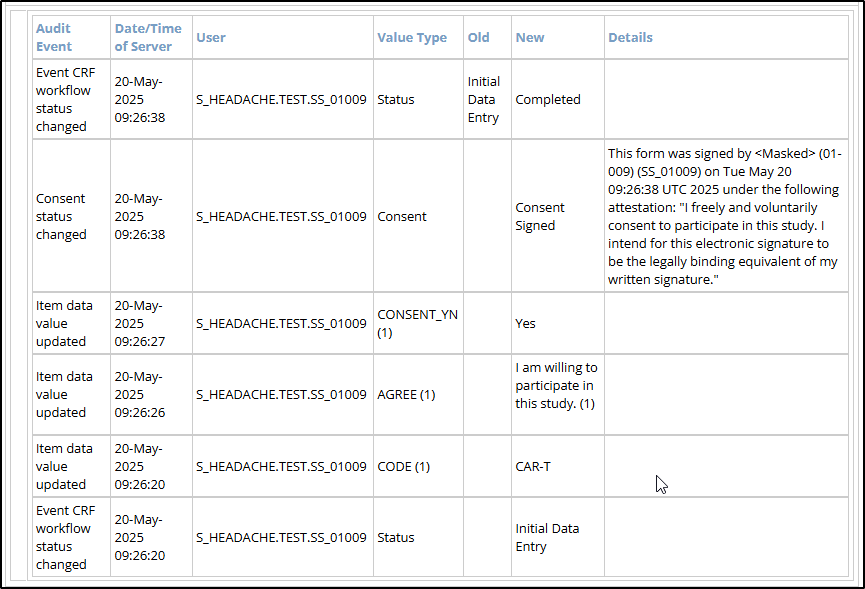
- Audit Event: The type of action recorded (e.g., Event CRF workflow status changed, Item data value updated, etc.)
- Date/Time of Server: The server timestamp when the audit event occurred.
- User: The username of the person who performed the logged action.
- Value Type: The field that was modified (e.g., Status, [form item OID], etc.).
- Old: The value before the change was made. Blank if newly created.
- New: The updated value after the change. Blank if the value was removed.
- Details: Populated when an eConsent form is signed.